
MailStore v13, Cloud Services and Modern Identity Authentication Enhanced Support
Like many other companies, the MailStore team also worked from home for a few weeks during the first half of the year, carefully developing our archiving solutions during this period. The team's success is highlighted with the current version of MailStore Version 13 that we want to present to you now.


New Features in MailStore 13
Our new version, with a few new features and numerous improvements, will not only satisfy administrators but also end-users and business owners. "We have divided these features into four main categories," says MailStore Product Manager Björn Meyn. "First, we have improved the interaction of our software with cloud-based services such as Microsoft 365 and Google G Suite, enabling much easier integration with these services. The second focus point of MailStore 13 is to support modern authentication via OAuth2 and OpenID Connect. Enhanced security and an advanced user experience are our third and fourth main categories. Long-time MailStore customers will recognize that we take these two topics very seriously and they have always played an important role in each version."
Overview
- What can administrators expect from V13?
- How will end-users benefit from the new version?
- Why should business owners eagerly await V13?
- What about MailStore Home users?
- Availability
- Change logs
- More information
What Can Administrators Expect from V13?
MailStore 13 offers several new features and improvements that make administrators' jobs easier. Some of the features particularly important for administrators are:
Enhanced Support for Cloud Services and Modern Authentication
MailStore Server and MailStore Service Provider Edition (SPE) now support OAuth2 and OpenID Connect, significantly improving integration with Microsoft 365 and Google G Suite's cloud environments. This is good news for administrators because it not only ensures that MailStore is user-friendly alongside these cloud services but also enhances security. Administrators can now use the same settings (including multi-factor authentication) for Microsoft 365 or Google G Suite clients without having to enable legacy authentication or less secure application access. The new two-step login process mimics the login routines used in modern web applications, and MailStore no longer needs to process users' passwords during authentication.
In addition, new dedicated Microsoft 365 archiving and export profiles make it easier for administrators to configure these profiles. Modern OAuth2 authentication support not only improves security but also enhances integration with Microsoft 365.
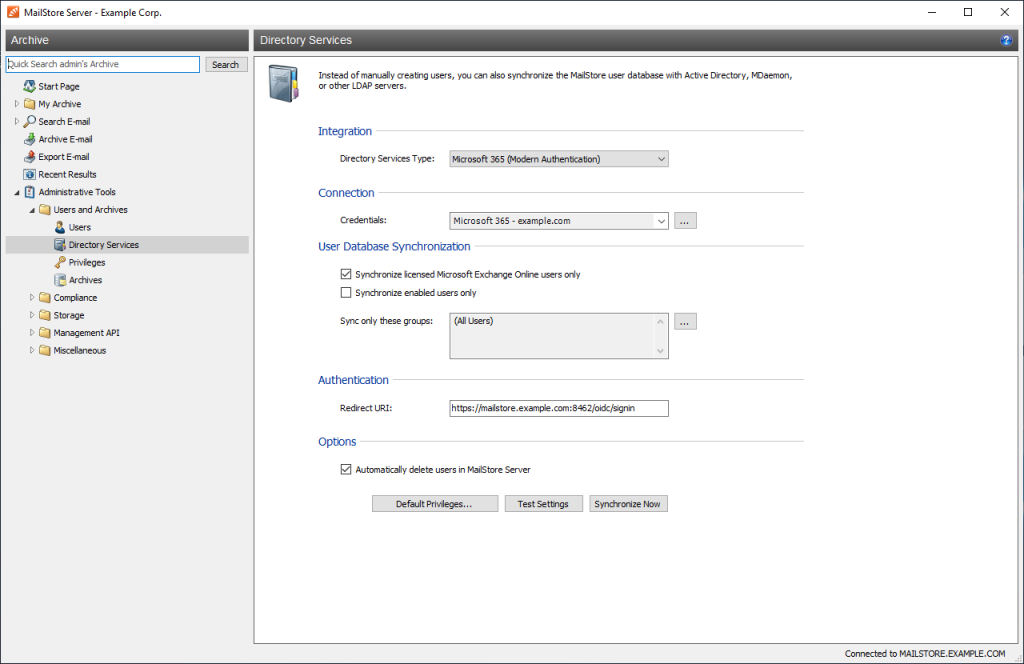
MailStore Version 13 offers enhanced integration with Microsoft 365 - for example, via a new user synchronization path to support modern authentication.
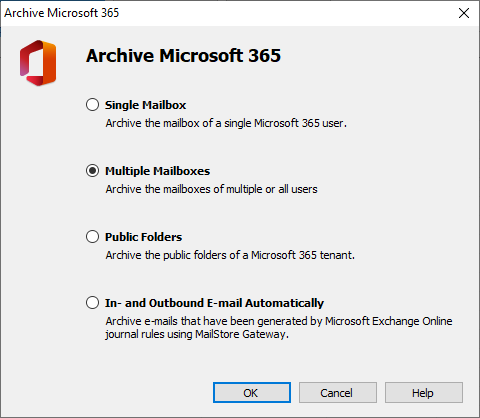
Dedicated archiving profiles for Microsoft 365 make the IT administrator's job easier.
Network Share Management
MailStore Server administrators can now benefit from advanced management of network share settings. These settings are now managed more conveniently and securely via MailStore Server's Service Configuration instead of a startup script - for example, when using a NAS.
Group Policies
Creating group policies for the MailStore Client and MailStore Outlook Add-in is now easier than ever: when it comes to MailStore Server, templates are now included in the installation, while in SPE they can be downloaded from the default page of the Client Access Server. In Version 13, these templates are available in all languages supported by MailStore.
Certificate Validation
Another development for MailStore Server and SPE administrators is new certificate validation. This aligns with the verification process used in most major web browsers and allows administrators to create and apply standardized security and certificate policies for all MailStore clients (MailStore Client, Outlook Add-in, and Web Access).
Only Encrypted Connections
In Version 13, support for unencrypted connections to MailStore Server has been completely removed. As a result, administrators can be sure that all MailStore Server installations only allow encrypted connections for archiving, which can be particularly helpful for administrators managing multiple installations.
Encrypt-It-Certificates™
Administrators can now specify a port for MailStore Server's Let's Encrypt™ TLS Certificates validation, ensuring that no port conflicts occur when MailStore Server is run alongside other services on a computer or when only a limited number of IP addresses are available. This simplifies the use of Let's Encrypt certificates.
MailStore Gateway
In Version 13, administrators can now see at a glance how many messages are in a mailbox via the MailStore Gateway. The new version still allows for the forced deletion of mailboxes that still contain messages. Additionally, if standard ports are used by other applications or if an administrator wants to convert the standard HTTPS connection port 443 into a different one, the Management Web Interface port can be changed.
How Will End Users Benefit from the New Version?
MailStore 13 also offers several new and improved features aimed at making archiving easier for end users. These include:
Modern Authentication
Users of MailStore Server and SPE can now log in using their traditional Microsoft 365 or Google G Suite login credentials. As a result, they no longer need to remember separate passwords for MailStore; instead, they simply use their Microsoft 365 or Google G Suite login credentials. This way, they can also benefit from additional security features such as multi-factor authentication provided by these cloud services when accessing their archives.
Removal of Mobile Web Access
Customers who previously used Mobile Web Access for MailStore Server and SPE can now use our modern and secure responsive Web Access. The old Mobile Web Access is no longer available in Version 13.
Client-Based Improvements
Users of MailStore Server and SPE benefit from a series of improvements in accessing and using the archive. The load time for responsive Web Access has been significantly reduced, especially for mobile devices. In addition, various small improvements have been made to ensure a smoother search experience on mobile devices and all web components have been comprehensively updated. The responsive screen on mobile devices has also been significantly improved, providing a wider reading area. In addition, the new "jump to folder" feature allows you to directly navigate to the desired folder by clicking on the folder path in the message view, making it easier to find emails related to a specific project or shared folder. Time information is also displayed next to the date in the MailStore Client's message list.
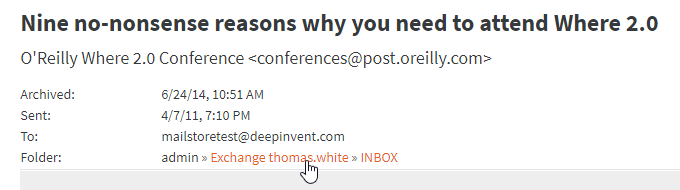
Clicking on the folder path takes you directly to the relevant folder.
Only Encrypted Connections
In Version 13, unencrypted connections to MailStore Server are no longer supported. This means that end users will receive fewer warning messages when using a modern web browser to access the archive and can be assured of secure connections with MailStore Server. It is also easier for end users to verify the security of a connection via their browser (for example, via the lock icon in Chrome's address bar). This is particularly useful when using untrusted connections such as public Wi-Fi networks at airports.
Certificate Validation
This aligns with the certificate validation routine of the most important web browsers, allowing end users to identify security policy violations on all clients (MailStore Client, Outlook Add-in, and Web Access) both on MailStore Server and SPE.
Why Should Business Owners Await V13 with Eager Expectation?
It goes without saying that when email processing is simplified for administrators and end users, management also benefits. In addition, there are three arguments in particular that are favorable to business owners regarding MailStore 13:
Enhanced Support for Cloud Services and Modern Authentication
Business owners can be confident that we will continue to support current industry standards and technologies, ensuring their investment in MailStore is secure in the long run - and this applies to important cloud-based services such as Microsoft 365 and Google G Suite as well.
Encrypted Connections and Standardized Certificate Validation
Business owners can also be confident that MailStore's software will continue to raise its security concept in line with industry standards and security recommendations. At the same time, we always keep the needs and IT infrastructure of small and medium-sized businesses in mind. Our slogan is "Security by Default". This makes MailStore a reliable and long-term choice when it comes to email archiving solutions.
GDPR Certified
As in the previous version, MailStore Server 13 has been meticulously checked by an independent data protection expert in accordance with the rules of the General Data Protection Regulation (GDPR). This certificate confirms that MailStore Server meets the personal data processing requirements specified in GDPR when used appropriately. Thanks to these regular and independent software checks, business owners can be assured that MailStore Server helps them fulfill their GDPR obligations, for example by defining complex retention policies. The official certificate of the audit results can be requested by interested customers and partners via info@sintel.com.tr. Registered MailStore partners can also download the certificate from our Partner Portal.
For managed service providers who offer email archiving as a service to their customers via MailStore Service Provider Edition, the following applies: MailStore SPE Version 13 has been checked and approved according to the same criteria as MailStore Server in compliance with the EU's GDPR. Registered MailStore partners can download the certificate from our Partner Portal or request it via email at support@sintel.com.tr.
Source: MailStore Version 13: Improved Support of Cloud Email Services