
Microsoft 365 - Transition to Modern Authentication from October 1, 2022
Google announced in 2019 that they would be shutting down less secure app access (the equivalent of Google's Basic Authentication) for Google Workspace (formerly G Suite) accounts by June 2020. Due to the COVID-19 pandemic, the deadline has been postponed until the next announcement. Microsoft, on the other hand, will finally end Basic Authentication on October 1, 2022. For Microsoft 365 customers, access to Exchange Online will only be possible with Modern Authentication.


Microsoft 365 – Transition to Modern Authentication from 1 October 2022
End of Basic Authentication
Google announced in 2019 that they would be closing access to less secure apps (the equivalent of Google's Basic Authentication) for Google Workspace (formerly G Suite) accounts by June 2020. Due to the COVID-19 pandemic, this deadline was extended. Microsoft has finally decided to end Basic Authentication on 1 October 2022. For Microsoft 365 customers, access to Exchange Online will only be possible with Modern Authentication.
Basic Authentication has been disabled by default for new Microsoft 365 tenants since October 2020 and for existing Microsoft 365 tenants as well.
Transitioning to Modern Authentication ensures much better protection for user accounts and the data they contain. In addition, Modern Authentication can improve the user experience. Below, we explain the differences between Basic Authentication and Modern Authentication, why Basic Authentication does not provide sufficient protection, and the advantages you can gain from Modern Authentication.
What Exactly Is Basic Authentication?
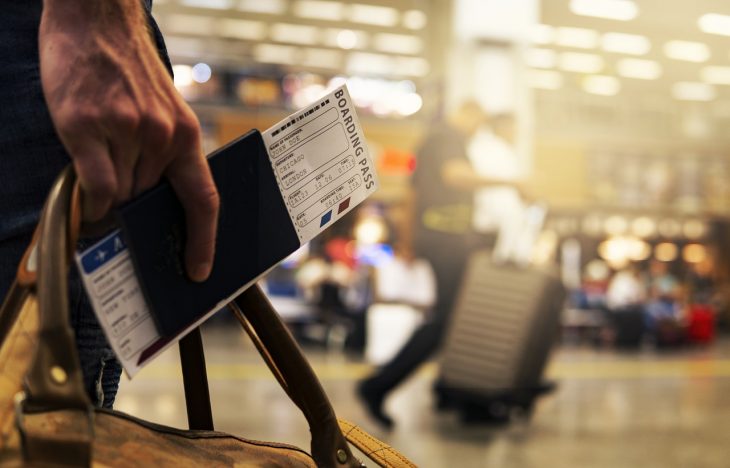
If border control worked like Basic Authentication, there would be no passports.
To understand how Basic Authentication actually works, we provide an analogy here. Imagine this scenario: you're flying abroad, you exit the plane and go to border control. Now imagine that the process is slightly different from what you're used to. Instead of showing your passport, you tell the security officer, "Hello, my name is John Doe, my password is XYZ, and I'm originally from Germany." The security officer then contacts the national authorities in Germany to explain, "There's a man at my station who wants to enter our country. He says his name is John Doe and his password is XYZ. Is that correct?" The authorities check the information and confirm it. Therefore, the security officer is happy to tell you that your information is correct and that you are allowed to enter the country. A procedure like this at border control would not be very appropriate, right? So what is wrong with this approach? First of all, there are no additional checks such as a photo in the passport. How can the security officer know that you're actually the person you claim to be? Anyone who knows your name and password could act like you. Second, you have to disclose sensitive information to another person (the security officer) and rely on their trust. In the digital world, Basic Authentication essentially works this way.
The History of Basic Authentication
Initially, the term "Basic Authentication" defined an authentication scheme described in RFC 7617 and originally created for HTTP authentication. If you go to a website and a browser pop-up window asks you to enter your username and password, that is what Basic Authentication originally described. This type of authentication is also used as an authentication scheme in Microsoft Exchange Servers. Basic authentication is also known as plain text authentication or less secure apps (Google). Therefore, summarizing the definition: Basic Authentication is any authentication based on plain usernames and passwords.
What Are the Problems with Basic Authentication?
In the digital world, having access to identity information means that you have access to whatever resource you want with those credentials. The service where the resource is stored cannot distinguish between you and other people who have access to those credentials. Regarding Microsoft 365 or Google Workspace, this would mean that if you allow someone access to your mailbox, they could also use the same credentials to access other services such as Microsoft SharePoint, Teams, and more in your Microsoft or Google tenant. With technology based on Basic Authentication, it is nearly impossible to restrict access to other resources that can be accessed with the same credentials. This means that your data gateways are completely open and require protection. If all of this sounds so risky and insecure, why have we been using this type of authentication for such a long time in the digital world?
What Is Modern Authentication?
Modern Authentication is a term initially defined by Microsoft, but many other companies also use it to describe a set of the following:
- Authentication methods (authentication = how you log in to a system)
- Authorization methods (authorization = mechanisms that prevent default full access to something)
- Conditional access policies (policies that define conditions where additional steps must be taken to log in to a system)
Authorization and authentication methods are standardized in the digital world. The industry standard for authorization is OAuth2. There is no industry standard for authentication, but the most commonly used standard is OpenID Connect. Although these standards serve different purposes, they are very closely related technically. The OpenID Connect protocol package extends the OAuth protocol and uses the same underlying technologies. OAuth was never designed to authenticate users or people, only to authenticate services. This is why OpenID Connect was created.
How would Modern Authentication look in our airport analogy? The procedure with Modern Authentication is quite familiar: you're flying abroad, you exit the plane and go to border control. The officer wants to see your passport to get all the important information needed to determine who you are and where you're from. These details are protected against fraud mechanisms. In digital terms, the passport is what we call an identity token. This token contains important information: who you are, who created the token, how long it is valid, etc.
Where Does Multi-Factor Authentication (MFA) Fit Into This Model?
Two-Factor Authentication (2FA) and Multi-Factor Authentication (MFA) are part of the authentication process. Here's how it works: as a user, you connect to your identity provider that must verify that the person attempting to connect is actually you. Depending on conditional access policies defined by the administrator, your identity provider may ask for more information from you. If the identity provider believes that just entering your credentials is not sufficient to verify your identity (for example, if you're connecting from an unknown network), it may ask for additional information such as a code sent to your mobile phone. Microsoft applies this in a very dynamic way. The system continuously learns and decides what is a secure system. In addition, you can also define devices as secure. If a device is defined as secure, your credentials are only requested once and a cookie is stored in your browser so that you can log in immediately the next time without having to re-enter your credentials or provide more details. These are additional policies that an administrator can define, and this is especially relevant when many people are working from home (for example, using an unsecured network instead of a corporate VPN at home).
What Are the Advantages of Modern Authentication?
One of the biggest advantages for administrators is that all these policies can be configured in a single centralized location within the identity provider. This means that the more applications that connect to the identity provider, such as Microsoft Azure Active Directory and the identity services provided by Microsoft, the easier it becomes to configure conditional access policies for all these applications. In this way, the administrator does not need to configure separate login policies and security settings for each application. The administrator has a single location where they can define login policies for all applications integrated with the identity provider. In the long run, the more applications that support this type of authentication, the more user-friendly and easy it becomes for the administrator. And of course, Modern Authentication is much more secure than Basic Authentication.
How Does Authentication Work in MailStore Server and MailStore SPE?
MailStore Server and MailStore Service Provider Edition (SPE) require authentication when users synchronize from a directory service, to access mailboxes, archive or export messages, or to log in to MailStore archives to access emails. Below, we will explain how authentication with Basic Authentication works with Microsoft 365 and Google Workspace (formerly G Suite), and how it works with Modern Authentication when using MailStore Server or MailStore SPE. For the sake of readability, although all of the following applies to MailStore SPE as well, we will only refer to MailStore Server.
MailStore Server and Basic Authentication
In the past, how did authentication with Microsoft 365 and Google Workspace work? Initially, a user opens a client application (MailStore Client, MailStore Outlook Add-in, or MailStore Web Access), enters their credentials, and sends them to the MailStore Server. Then, the MailStore Server realizes that this user is synchronized from a remote directory service. In this case, the MailStore Server connects to the directory service itself (if it provides an authentication interface) or, if it is Microsoft 365, attempts to log in to the user's Exchange Online mailbox with the provided credentials. If the login to the mailbox is successful, this information is passed on to MailStore Server. Then, the MailStore Server informs the client application that the credentials are correct and that the user has logged in and can search the archive.
Microsoft 365 profile worked this way with Basic Authentication.
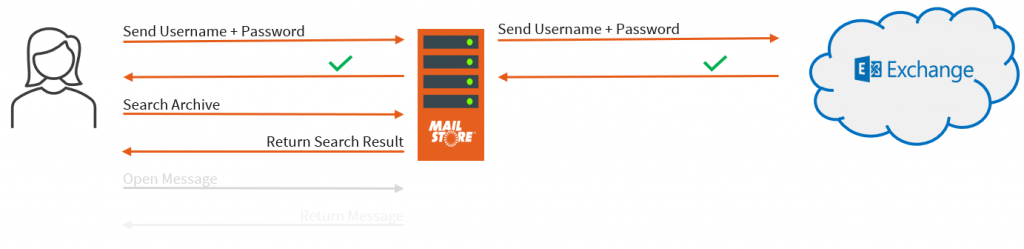
Basic Authentication in MailStore Server and MailStore SPE
MailStore Server and Modern Authentication
How does Modern Authentication with Microsoft 365 and Google Workspace work now with MailStore Server? In the first step, the user enters only their username. Then, the MailStore Server checks whether the user's authentication attribute is set to MailStore integrated or to directory services, and what type of directory service is currently configured. Depending on the result, a password is requested from the user or, if the configured directory service supports Modern Authentication, the user is redirected to a third-party identity provider. When it comes to Modern Authentication with Microsoft 365, the MailStore Server returns the identity provider's login URI. When using the MailStore Client or MailStore Outlook Add-in, a web browser is automatically opened to access the identity provider's login URL. When using MailStore Web Access, users are automatically redirected to the identity provider's login URL. What happens next depends on the conditional access policies defined by the administrator. If the user logs in from a secure network where the administrator has not defined any additional policies, entering the credentials is generally sufficient. If the administrator has defined additional policies, the user may be asked to provide additional information (e.g., MFA). If authentication with the identity provider is successful, the identity provider knows which application the user wants to log in to initially. In this way, the identity provider redirects the user to MailStore Server and enables it to send an identity token to MailStore Server. The identity token is validated by the MailStore Server and additional user information is requested from the identity provider (e.g., display name address). This helps MailStore Server to match the user attempting to log in with the MailStore user. Then, the login is marked as authenticated and the user can access the archive.
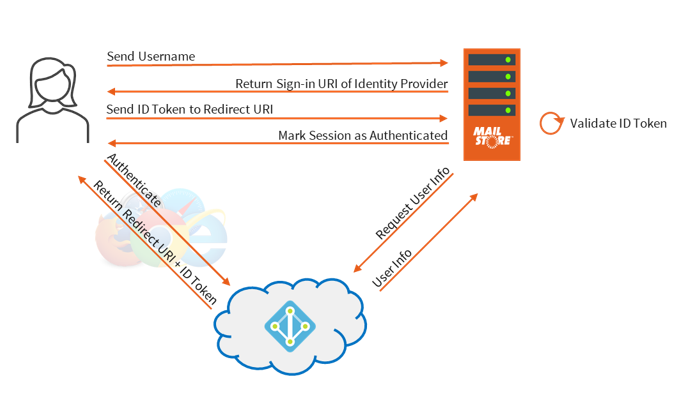
Modern Authentication in MailStore Server and MailStore SPE
In Conclusion
Don't delay any longer. Transition to Modern Authentication immediately. Modern Authentication is not only much more secure than Basic Authentication, but it is also more user-friendly and makes the administrator's life easier. MailStore Server and SPE have supported Modern Authentication via OAuth2 and OpenID Connect since version 13, significantly improving MailStore's integration with Microsoft 365 and Google Workspace's cloud environments. You can find everything about the current MailStore Server Version and MailStore Service Provider Edition Version here: MailStore V22.2 Supports Windows 11 and Windows Server 2022.
If you're using Microsoft 365 and want to start using MailStore Server, we recommend our Technical Tip: Archiving Microsoft 365 for New MailStore Customers. The two videos in this Technical Tip show you how to connect MailStore Server to your Microsoft 365 tenant using Modern Authentication, how to synchronize users, and how to customize archive profiles.
Are you using Microsoft 365 but not yet aware of the advantages of using a third-party email archiving solution like MailStore Server? Then take a look at the free technical review created by the market research institute Osterman Research. You can find more information on this topic in our blog post titled Archiving Emails in Office 365.
Source: Microsoft 365 - Transition to Modern Authentication from 1 October 2022 (mailstore.com)