
Archiving Emails in Microsoft Outlook - The Hidden Archive Button
Microsoft Outlook users have various options to archive emails. The fastest one is the archive button, which is embedded in Outlook's menu bar and can be accessed without needing to search for it.


Archiving Emails in Microsoft Outlook: The Hidden Archive Button
Microsoft Outlook users have various options to archive emails. The fastest one is the archive button, which is embedded in the menu bar and can be accessed without having to search for it.
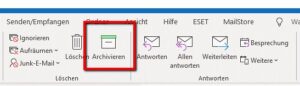 Have you ever used the archive button? Did you ever accidentally click it while trying to delete an email? Or did you make a conscious decision to use it? Some people find this useful, but we think it might lead you astray. Because, when it comes to email archiving, you don't need to be an expert in email archiving to know that the archive button doesn't meet the requirements expected from a professional email archiving solution.
How Does Archiving Emails Work with the Outlook Archive Button?
So, what does the archive button do? Basically, it allows you to move an email from your inbox to an archive folder. However, since this folder is also in Outlook, all you're doing is changing the storage location of your emails. Therefore, even though Microsoft calls this option "archiving," it doesn't meet the criteria expected from a professional email archiving solution. By definition, an archive is the final storage location of documents in a chain of usage; therefore, it must be possible to store this material permanently, for example through security measures. Today, the EU GDPR and other similar legal requirements mean that email archiving has become a very complex subject in daily corporate practice. At the same time, an archive's role is to ensure that all its records - in this case emails - are always available.
The Disadvantages of Using the Outlook Archive Button
If you want to professionally archive your emails or are required to do so for legal reasons, using the archive button involves certain risks.
The archive button is not suitable for:
- protecting against data loss, as it does not protect against manipulation or deletion of emails;
- potentially reducing the volume of data in a mailbox, as the archive folder is located within the Outlook mailbox;
- ensuring that email data remains permanently accessible, as emails can no longer be accessed if Outlook fails.
The archive button is only suitable for visually simplifying your inbox. When you use the archive button, you move old emails from your inbox to an archive folder. You can use Outlook's search function to find old emails, including those you have moved to the archive folder.
What Other Email Archiving Options Does Microsoft Offer?
The primary goal of any professional email archiving solution is to ensure that email data remains accessible and thus permanently usable over time. To achieve this, the archiving solution stores copies of all emails in a central archive, thereby guaranteeing the long-term usability and security of the data.
For this reason, although Microsoft offers various applications related to email "archiving" in Outlook, Exchange Server and Microsoft 365 products, these do not fully meet the goals of a professional email archiving solution or only partially achieve them.
- Archiving to PST Files / Automatic Archiving (Outlook)
Users can move emails to PST files and store them locally on their own computers or in the cloud.
- Archiving the Mailbox Without Exchange Online Archiving
An archive mailbox is a separate mailbox with its own storage space where emails can be moved. This archive mailbox should be set up by an administrator.
- Archiving the Mailbox With Exchange Online Archiving
With Exchange Online Archiving (EOA), users can move their emails to a separate archive mailbox, where administrators can apply their own archiving and retention policies.
Why Should You Use an Independent Email Archiving Solution?
At first glance, it may seem beneficial for email archiving functions and the email client to be on the same platform. However, in general, Microsoft's email archiving options do not meet the requirements of a professional email archive.
PST files or the archive button do not provide real protection against data loss when it comes to securely and safely storing emails. Similarly, the separate archive mailbox available in M365 (without using Exchange Online Archiving) does not fully meet the criteria of a professional email archiving solution. Only the archive mailbox that comes with Exchange Online Archiving (EOA) has the features and functions required for professional email archiving, such as retention policies, legal holds, and eDiscovery options. However, since Exchange Online Archiving is only included in the more expensive Business Premium and Enterprise M365 plans, it is usually not an option for small or medium-sized businesses due to financial constraints.
A professional, independent email archiving solution offers a wide range of features at a reasonable price and is therefore more suitable for SMEs.
Below are some of the key advantages of an independent email archiving solution.
Independence from Microsoft
Without an external email archive, users cannot access their emails if the Microsoft 365 service fails. Using an external email archive prevents vendor lock-in and ensures that the company's emails remain accessible even if M365 fails.
Self-Service for End Users
Users not only have a quick and efficient archive search function, but can also easily and quickly restore archived emails without having to contact a system administrator.
Protection Against Data Loss and Manipulation
Once emails are archived, they cannot be deleted or modified by the user. Only an administrator can define how long emails are stored in the system. Journaling provides seamless archiving.
Compliance with Data Privacy Laws
When used properly, certified email archiving solutions ensure that emails are processed in compliance with relevant data privacy laws. Especially since the EU's GDPR came into force, data privacy has become a major focus for public attention.
Reasonable Total Cost of Ownership (TCO)
An independent email archiving solution offers a wide range of features at a reasonable price. In particular, small and medium-sized businesses (SMEs) can benefit from it and do not have to resort to expensive corporate solutions.
Conclusion - The Outlook Archive Button Cannot Professionally Archive Emails
The archive button offers much less than its name suggests. In some cases, it can save time by eliminating the need to manage many subfolders in an inbox. However, it does not meet the criteria expected from a professional email archiving solution. In two free technical analyses, we detail which email archiving options are available in Microsoft 365 and Microsoft Exchange Server and which ones best meet your needs.
Source: Outlook Archive: Archiving Emails with Outlook's Archive Button (mailstore.com)