
Storage Policies in MailStore
On May 25, 2018, GDPR came into effect in the EU. Under this new regulation, customers will find one of the features of our Software Version 11 quite interesting: individually definable retention policies.


MailStore Server and MailStore SPE: GDPR Compliance with Retention Policies
MailStore Server and MailStore SPE users can now configure storage policies in compliance with GDPR regulations, especially Article 17 of the GDPR, also known as the right to be forgotten (right to erasure). This allows administrators to have full control over the periods during which various types of emails are archived by defining individual retention policies. Administrators can define whether emails will be automatically deleted from the archive and when they will be deleted, thus complying with the mandatory different retention periods required by legislation. In this context, it is important to use the archiving date as a guiding factor for automatic deletion, since the sending or receiving date of an email can be easily manipulated. All general retention policies from previous versions are automatically adopted in this upgrade.
Defining Retention Policies
The procedure for administrators to define new retention policies is quite simple in MailStore. They can select 'Compliance' -> 'Compliance General' from the menu. Then, under 'Retention Policies', they can define how long specific emails will be stored in the archive and prevent unauthorized deletion.
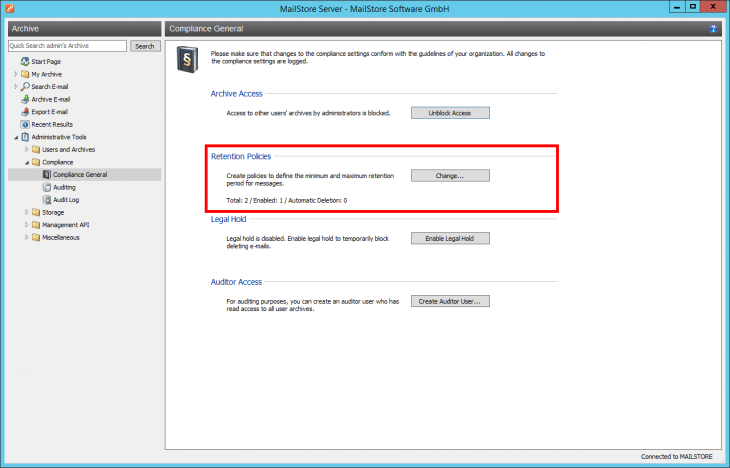
Administrators should also consider that defining a single general retention policy for all emails may not be sufficient in certain situations or countries. For example, in Germany, these regulations affect job applications, which must be permanently deleted after approximately a 90-day retention period. MailStore 11 now offers more flexibility regarding retention periods for email archives.
However, a general retention period applicable to all emails should be used during the initial setup. At least, administrators should select the maximum retention period required by law when a specific country is involved. These settings must be approved for each individual retention policy and then separately enabled to protect the administrator. This allows for the addition of any number of retention policies that meet specific criteria defined individually, based on archive searches. For example, administrators can define different periods for 'non-office notifications' or 'applications'.
Retention Policy as Required
All created policies are displayed in a list according to their priority. What does this mean? Based on the attributes stored in the policies, a search is performed in the email archive at a specific time defined as 'Job'.
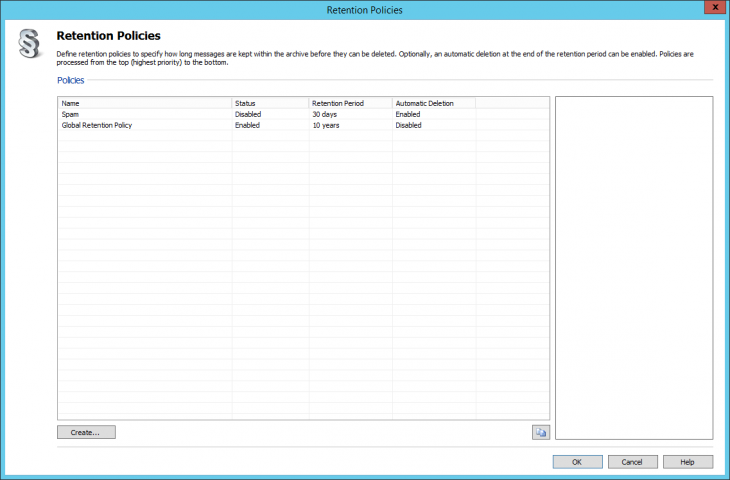
The search identifies emails that exceed the defined retention period and these will be deleted. By default, the search starts at 03:30 and identifies emails associated with the highest priority policy in the list.
In this context, for example, a general retention policy that ensures no email is deleted before a certain time should always be placed under other retention policies that allow specific types of emails, such as job applications, to be deleted before the period is up.
It is also possible to change the prioritization separately. Since automatic searches can take a long time depending on the size of the archive and thus negatively affect the workload, these searches are performed at night.
After defining the required retention policies, administrators should perform a proper verification of these policies before they are approved and become binding. To do this, the administrator temporarily enables email preview using the administrator password to access the email archive. Once verification is complete, the email preview should be disabled again. In the meantime, this step is logged, so we recommend entering a reason for accessing the archive (e.g., 'reviewing retention policies') in the provided field. As part of searching for emails affected by a retention policy (e.g., 'non-office notification'), the administrator can see which retention policy is applicable to an email after opening it and using the 'Retention Details' button on the toolbar to see how long the relevant email is stored.

If an administrator attempts to delete an archived email protected by a valid retention policy, the deletion operation is rejected and MailStore displays a relevant message.
MailStore Server and MailStore SPE: Differences
The basic procedures described regarding retention policies apply to both MailStore Server and MailStore SPE. However, with regard to MailStore SPE, only the administrators of end customers are allowed to use retention policies. The administrator of the service provider ("$archiveadmin") cannot access retention policies.
You can find a support video explaining how to set up retention policies here:
Detailed instructions on setting up and using retention policies can be found here.
Source: Feature Spotlight: Retention Policies in MailStore - MailStore